Are you experiencing issues with your workshop not being routed correctly? This could be due to duplicate accounts created with different email addresses. While you can’t merge accounts on your own, our Customer Support Team is here to help!
What Causes Duplicate Accounts?
Duplicate accounts often occur when:
✦ You are not signed in or haven’t created an account at the time of purchase, and the email linked to your payment method auto-fills at checkout.
✦ Apple’s Hide My Email feature
These can route the Order Confirmation and workshop access to a different email address than the one you intended to use.
Double-Check Your Information at Checkout
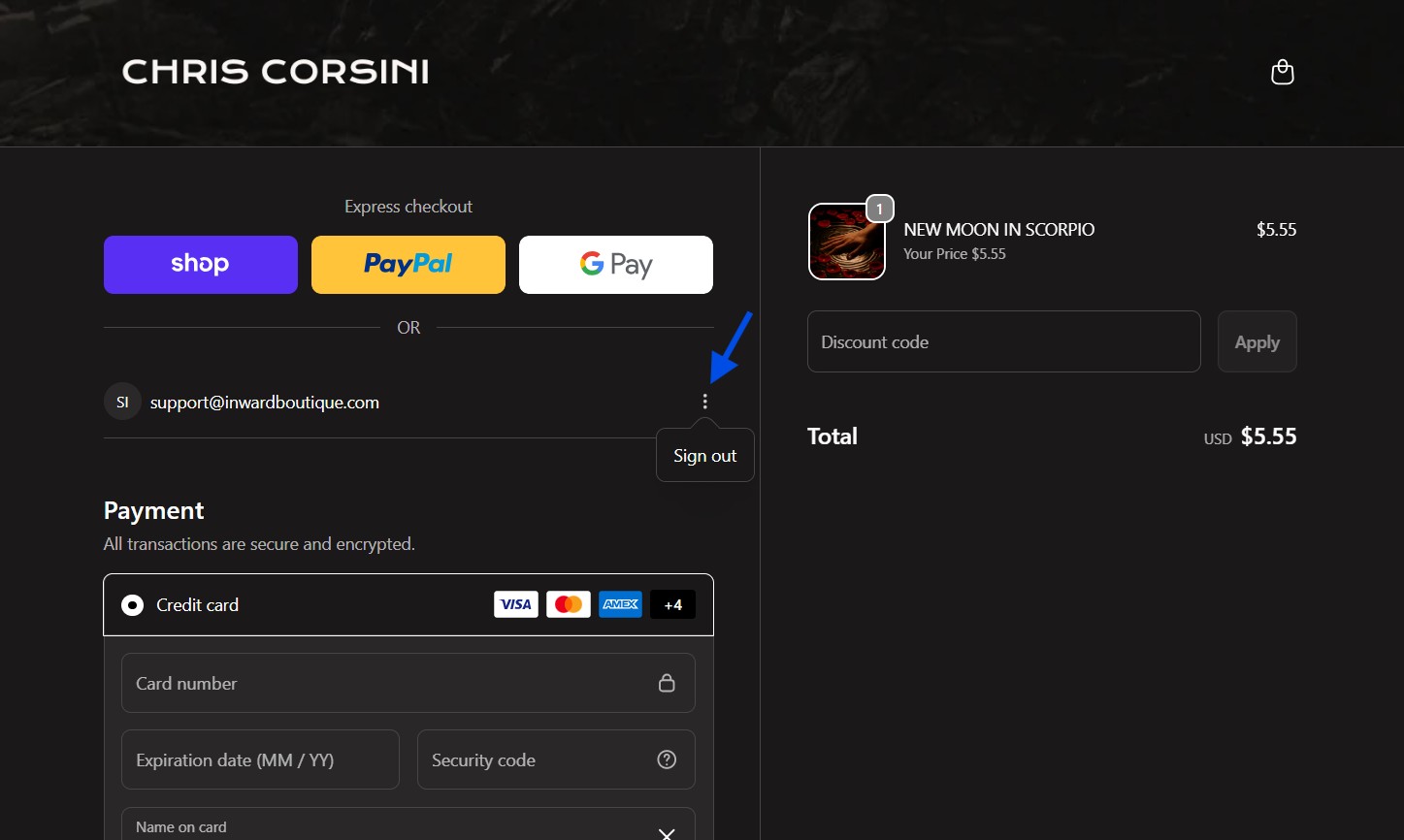
When purchasing workshops or registering for events, please double-check your email address at checkout, especially when using Apple Pay, Shop Pay, or other auto-fill payment methods. Using the same email for all transactions helps prevent account duplication. If you reach the checkout page and notice the email doesn’t match the one on your account, tap or click the three-dot menu to sign out, then sign back in with your correct account email before completing your purchase.
Information We Need To Resolve
To help us resolve this issue, please provide:
- A screenshot of your Order Confirmation number
- Your full name
- Any alternative email addresses that may be linked to this purchase. Your workshop may be sent to the email address linked to your payment method. This sometimes happens if you're not logged into your account on our website when making a purchase, and creates a duplicate account
- The email address you prefer to use for your account
Our team will consolidate your workshops under your preferred email address.
How To Prevent Recurrence
While merging duplicate accounts requires assistance from our support team, you can take these proactive steps to make sure your account details are consistent and correct. This will help prevent future issues with workshop routing.
✔ Always use the same email address when making purchases.
✔ Review your checkout details before completing transactions.
✔ If you suspect an account issue, contact us as soon as possible.
Contact Us!
If you suspect you may have a duplicate account-related issue, don't hesitate to reach out to our Customer Support Team for help!
Was this article helpful?
That’s Great!
Thank you for your feedback
Sorry! We couldn't be helpful
Thank you for your feedback
Feedback sent
We appreciate your effort and will try to fix the article